Showing posts with label Arduino. Show all posts

Thursday, May 7, 2015

The iHacklab Knight Rider

How to build Knight Rider Lights Version on an Arduino:
by J.B. Wylzan


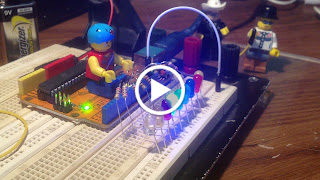
Project 4: Knight Rider Version


This project turns On 9 LEDs from left to right, then right to left continuously.


Hardware:
9 LEDs

9 resistors; 200 ohms 
connecting wires
breadboard

Arduino Uno

Schematic Diagram:


Block Diagram:


Code # 4:

/*
  iHackLab Chasing Lights (Knight Rider Version)
  powered by Arduino
  sketched by J.B. Wylzan
  modified by Lawsinium

  Turns on LEDs from left to right then right to left continuously.
  This example code is public domain.
 */

 // Setup pins 4 to 12
void setup() 
 {
  pinMode(4, OUTPUT);
  pinMode(5, OUTPUT);
  pinMode(6, OUTPUT);
  pinMode(7, OUTPUT);
  pinMode(8, OUTPUT);
  pinMode(9, OUTPUT);
  pinMode(10, OUTPUT);
  pinMode(11, OUTPUT);
  pinMode(12, OUTPUT);
 }

// Turns LEDs On and Off from left to right repeatedly,
void loop() 
{
  digitalWrite(4, HIGH);   // turn the LED on 
  delay(100);
  digitalWrite(4, LOW);    // turn the LED off 
  
  digitalWrite(5, HIGH);   // turn the LED on
   delay(100);
  digitalWrite(5, LOW);    // turn the LED off

  digitalWrite(6, HIGH);   // turn the LED on
  delay(100);
  digitalWrite(6, LOW);    // turn the LED off
  
  digitalWrite(7, HIGH);   // turn the LED on
   delay(100); 
  digitalWrite(7, LOW);    // turn the LED off 

  digitalWrite(8, HIGH);   // turn the LED on 
  delay(100);
  digitalWrite(8, LOW);    // turn the LED off
  
  digitalWrite(9, HIGH);   // turn the LED on
  delay(100);
  digitalWrite(9, LOW);    // turn the LED off
  
  digitalWrite(10, HIGH);   // turn the LED on
  delay(100);
  digitalWrite(10, LOW);    // turn the LED off
  
  digitalWrite(11, HIGH);   // turn the LED on 
  delay(100);
  digitalWrite(11, LOW);    // turn the LED off  
  
  digitalWrite(12, HIGH);   // turn the LED on
  delay(100);
  digitalWrite(12, LOW);    // turn the LED off
  
   digitalWrite(11, HIGH);   // turn the LED on 
  delay(100);
  digitalWrite(11, LOW);    // turn the LED off  
  
  digitalWrite(10, HIGH);   // turn the LED on
  delay(100);
  digitalWrite(10, LOW);    // turn the LED off
  
  digitalWrite(9, HIGH);   // turn the LED on
  delay(100);
  digitalWrite(9, LOW);    // turn the LED off
  
  digitalWrite(8, HIGH);   // turn the LED on 
  delay(100);
  digitalWrite(8, LOW);    // turn the LED off
  
  digitalWrite(7, HIGH);   // turn the LED on
  delay(100); 
  digitalWrite(7, LOW);    // turn the LED off 
  
  digitalWrite(6, HIGH);   // turn the LED on
  delay(100);
  digitalWrite(6, LOW);    // turn the LED off
  
  digitalWrite(5, HIGH);   // turn the LED on
   delay(100);
  digitalWrite(5, LOW);    // turn the LED off
  
}

Actual Layout:


Procedure:
1. Use the same prototype as shown above
2. Run the Arduino Interface
3. Select File > New
4. Copy Code #4 above
5. Paste Code #4
6. Click File > Save
7. Click Verify
8. Click Upload
9. All 9 leds must turn On and Off from left to right and right to left continuously


Disclaimer:  We shall not be liable for any loss or damage of whatever nature - direct, indirect, consequential, or otherwise - which may arise as a result of your use of any information on this website. However, if you are interested in using any of the projects for personal or educational purposes, please inform the author by email. 

Public Domain Notice: Copyright (c) 2000. All rights reserved. This article is part of a book entitled iHackRobot. Copies are welcome to be shared or distributed publicly as long proper citations are observed. Please cite as follows: Biotronics: The Silver Species, Joey Lawsin, 1988, USA.

================================================================== 
The Homotronics® and Homodruinos® logos are registered trademarks.
Copyright Biotronics© Inc. iHackRobot®. All Rights Reserved.
Patent Pending. 2000 © ®

A  L.A.W.S.I.N. Educational Production
 ================================================================== 


Wednesday, May 6, 2015

The iHacklab Runner

How to build Running Lights on an Arduino:
by J.B. Wylzan


Project 3:  Running Lights:
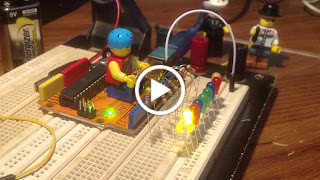
This project turns on the 9 Leds from left to right repeatedly.


Hardware:
9 LEDs
9 resistors 
connecting wires
breadboard
Arduino R3 UNO board

Schematic Diagram:

image created by fritzing


Block Diagram:


image created by fritzing


Code # 3:
/*
  iHackLab  Running Lights
  powered by Arduino
  sketched by J.B. Wylzan
  modified by Lawsinium

  Turns LEDs On and Off from left to right repeatedly.
  This example code is public domain.
 */

 // Setup pins 4 to 12
void setup() 
 {
  pinMode(4, OUTPUT);
  pinMode(5, OUTPUT);
  pinMode(6, OUTPUT);
  pinMode(7, OUTPUT);
  pinMode(8, OUTPUT);
  pinMode(9, OUTPUT);
  pinMode(10, OUTPUT);
  pinMode(11, OUTPUT);
  pinMode(12, OUTPUT);
 }

// Turns LEDs On and Off from left to right repeatedly,
void loop() 
{
  digitalWrite(4, HIGH);   // turn the LED on 
  delay(500);
  digitalWrite(4, LOW);    // turn the LED off 
  
  digitalWrite(5, HIGH);   // turn the LED on
   delay(500);
  digitalWrite(5, LOW);    // turn the LED off

  digitalWrite(6, HIGH);   // turn the LED on
  delay(500);
  digitalWrite(6, LOW);    // turn the LED off
  
  digitalWrite(7, HIGH);   // turn the LED on
   delay(500); 
  digitalWrite(7, LOW);    // turn the LED off 

  digitalWrite(8, HIGH);   // turn the LED on 
  delay(500);
  digitalWrite(8, LOW);    // turn the LED off
  
  digitalWrite(9, HIGH);   // turn the LED on
  delay(500);
  digitalWrite(9, LOW);    // turn the LED off
  
  digitalWrite(10, HIGH);   // turn the LED on
  delay(500);
  digitalWrite(10, LOW);    // turn the LED off
  
  digitalWrite(11, HIGH);   // turn the LED on 
  delay(500);
  digitalWrite(11, LOW);    // turn the LED off  
  
  digitalWrite(12, HIGH);   // turn the LED on
  delay(500);
  digitalWrite(12, LOW);    // turn the LED off
       
}

Actual Layout:


Procedure:
1. Use the same prototype as shown above
2. Run the Arduino Interface
3. Select File > New
4. Copy Code #3 above
5. Paste Code #3
6. Click File > Save
7. Click Verify
8. Click Upload
9. The 9 leds will turn On and Off from left to right repeatedly


Disclaimer:  We shall not be liable for any loss or damage of whatever nature - direct, indirect, consequential, or otherwise - which may arise as a result of your use of any information on this website. However, if you are interested in using any of the projects for personal or educational purposes, please inform the author by email. 

Public Domain Notice: Copyright (c) 2000. All rights reserved. This article is part of a book entitled iHackRobot. Copies are welcome to be shared or distributed publicly as long proper citations are observed. Please cite as follows: Biotronics: The Silver Species, Joey Lawsin, 1988, USA.

================================================================== 
The Homotronics® and Homodruinos® logos are registered trademarks.
Copyright Biotronics© Inc. iHackRobot®. All Rights Reserved.
Patent Pending. 2000 © ®

A  L.A.W.S.I.N. Educational Production
 ================================================================== 


Tuesday, May 5, 2015

The iHacklab Blinker

How to build Christmas Lights on an Arduino:
by J.B. Wylzan


Project 2:  The Blinking Lights
This project will blink all 9 leds at the same time.


*Instead of using 1 pin, this project will use 9 pins.These pins will turn on and off repeatedly. This project will also teach you how to program. It will also provide you some challenges like:
1. Turn on only all even leds.
2. Turn on only all odd leds.
3. Turn on and off all even and all odd leds.
4. Turn all leds on and off 
5. Turn all leds on and off with different delays


Hardware:
9 LEDs
9 resistors, 200 ohms
connecting wires
breadboard
Arduino UNO

Schematic Diagram:
image created by fritzing

Block Diagram:
image created by fritzing


Code # 2:  
/*
  iHackLab Blinking Lights
  powered by Arduino
  sketched by J.B. Wylzan
  modified by Lawsinium

  Turns all LEDs On and Off repeatedly.
  This example code is public domain.
 */

 // Setup pins 4 to 12
void setup() 
 {
  pinMode(4, OUTPUT);
  pinMode(5, OUTPUT);
  pinMode(6, OUTPUT);
  pinMode(7, OUTPUT);
  pinMode(8, OUTPUT);
  pinMode(9, OUTPUT);
  pinMode(10, OUTPUT);
  pinMode(11, OUTPUT);
  pinMode(12, OUTPUT);
 }

// Turn all Leds On and Off repeatedly
void loop() 
{
  digitalWrite(4, HIGH);   // turn the LED on 
  digitalWrite(5, HIGH);   // turn the LED on
  digitalWrite(6, HIGH);   // turn the LED on 
  digitalWrite(7, HIGH);   // turn the LED on
  digitalWrite(8, HIGH);   // turn the LED on 
  digitalWrite(9, HIGH);   // turn the LED on
  digitalWrite(10, HIGH);   // turn the LED on
  digitalWrite(11, HIGH);   // turn the LED on 
  digitalWrite(12, HIGH);   // turn the LED on
  delay(2000);
  
  digitalWrite(4, LOW);    // turn the LED off 
  digitalWrite(5, LOW);    // turn the LED off 
  digitalWrite(6, LOW);    // turn the LED off
  digitalWrite(7, LOW);    // turn the LED off  
  digitalWrite(8, LOW);    // turn the LED off
  digitalWrite(9, LOW);    // turn the LED off  
  digitalWrite(10, LOW);    // turn the LED off
  digitalWrite(11, LOW);    // turn the LED off  
  digitalWrite(12, LOW);    // turn the LED off
  delay(2000);         
}


Actual Layout:


Procedure:
1. Use the same prototype as shown above
2. Run the Arduino Interface
3. Select File > New
4. Copy Code #2 above
5. Paste Code #2
6. Click File > Save
7. Click Verify
8. Click Upload
9. Al 9 leds will turn On and Off repeatedly


Disclaimer:  We shall not be liable for any loss or damage of whatever nature - direct, indirect, consequential, or otherwise - which may arise as a result of your use of any information on this website. However, if you are interested in using any of the projects for personal or educational purposes, please inform the author by email. 

Public Domain Notice: Copyright (c) 2000. All rights reserved. This article is part of a book entitled iHackRobot. Copies are welcome to be shared or distributed publicly as long proper citations are observed. Please cite as follows: Biotronics: The Silver Species, Joey Lawsin, 1988, USA.

================================================================== 
The Homotronics® and Homodruinos® logos are registered trademarks.
Copyright Biotronics© Inc. iHackRobot®. All Rights Reserved.
Patent Pending. 2000 © ®

A  L.A.W.S.I.N. Educational Production
 ==================================================================